
메피카타츠의 블로그
Tactical Combat System 개발일지 8 - 클라이언트의 전투 결과를 서버가 검증하는 시스템 구축 본문
이번에는 클라이언트 전투 결과를 서버가 검증하는 시스템을 구축했다. 이전에 언급했듯 웹 API 서버에서 검증하는 방식인데, 이 기반은 기존에 만들었던 프로젝트를 가져왔다.
GitHub - Mepkatatsu/MiniServerProject
Contribute to Mepkatatsu/MiniServerProject development by creating an account on GitHub.
github.com
한 줄 요약: "게임 서버 컨텐츠 로직(스테이지 Enter/Clear/GiveUp) 구현을 통해 서버 중심의 상태 전이 기반 API, 멱등성(Idempotency), 운영 관점 예외/로그 처리를 목적으로 한 프로젝트입니다."
서버 관련 상세 내용은 해당 프로젝트의 README.md에 적어놓았으니 생략하겠다.
기존에 작업한 코드를 Submodule로 참조할 수도 있었는데, 클라이언트에서 참조할 코드도 있고, 새로 작업한 공용 코드를 참조해야하기도 해서 복사해와서 수정하는 방법을 택했다. Unity쪽에서 각종 참조를 관리하기 때문에 기존 서버 프로젝트에서 작업한 공용 코드를 Unity쪽에서 작업한 공용 라이브러리로 옮겼고, 서버와 연결하기 위한 테스트 클라이언트 코드도 Unity쪽 Client 라이브러리로 옮겼다. 이후 서버쪽 프로젝트에서 해당 프로젝트를 참조하는 방식으로 연결을 해주었다.

스테이지에 입장할 때 스태미너가 부족한 상황이 있을 것 같아 스태미너 100 회복하는 치트를 추가했는데, 지금 단계에서는 필요없던 작업이었던 것 같다 -_-a... (당장은 전투를 검증하는 기능만 넣어놨기 때문이다) 그래도 작업하면서 서버쪽 코드도 꽤나 수정이 필요하겠다는 생각이 들었다. 기존에 작업한 코드를 거의 가져다가 거의 똑같이 작업했는데, 반복되는 코드도 너무 많고 어디에 뭘 넣어야 하는지 같은 정보들을 기존 코드를 참조해서 직접 찾아 넣어야하기 때문에 작업도 불편하다고 느꼈다. 아무튼 이 내용을 설명하려면 너무 길어지니 README.md에 작성한 설명을 참조하길 바란다.

using System;
using System.Collections.Generic;
using System.Threading.Tasks;
using Script.CommonLib;
using Script.CommonLib.Requests;
using Script.CommonLib.Responses;
using Script.CommonLib.Tables;

namespace Script.ClientLib.Network.App
{
    public class TestClientApp
    {
        private readonly ClientContext _ctx = new();

        public async Task<bool> ConnectToServer(string url, string accountId)
        {
            _ctx.BaseUrl = url;
            _ctx.BuildApi();
            var response = await _ctx.Api.GetAsync<UserResponse>($"/users/{accountId}", true);

            if (response == null)
            {
                var createRequest = new CreateUserRequest(accountId, accountId);
                response = await _ctx.Api.PostAsync<CreateUserRequest, UserResponse>($"/users", createRequest);
            }

            if (response == null)
            {
                LogHelper.Error("Connect to server failed: CreateUser Failed");
                return false;
            }

            _ctx.InitByUserResponse(accountId, response);
            return true;
        }

        public async Task<bool> RequestEnterStage(string stageName)
        {
            if (!_ctx.IsInitialized)
            {
                LogHelper.Error("RequestEnterStage: ClientContext is not Initialized");
                return false;
            }

            if (_ctx.CurrentStageId == stageName)
                return true;

            var stageTable = TableHolder.GetTable<StageTable>();
            var stageData = stageTable.Get(stageName);

            if (stageData == null)
            {
                LogHelper.Error("RequestEnterStage: StageData not found");
                return false;
            }

            if (_ctx.Stamina < stageData.NeedStamina)
            {
                var cheatRequest = new CheatStamina100Request(_ctx.UserId, _ctx.GetRequestId());
                var cheatResponse = await _ctx.Api.PostAsync<CheatStamina100Request, CheatStamina100Response>($"/cheat/{_ctx.UserId}/stamina100", cheatRequest);

                if (cheatResponse == null)
                {
                    LogHelper.Error("RequestEnterStage: CheatStamina100Request Failed");
                    return false;
                }

                _ctx.SetStamina(cheatResponse.AfterStamina);
            }

            if (_ctx.Stamina < stageData.NeedStamina)
            {
                LogHelper.Error("RequestEnterStage: not enough Stamina");
                return false;
            }

            var enterRequest = new EnterStageRequest(_ctx.UserId, _ctx.GetRequestId());
            var enterResponse = await _ctx.Api.PostAsync<EnterStageRequest, EnterStageResponse>($"/stages/{stageName}/enter", enterRequest);

            if (enterResponse == null)
            {
                LogHelper.Error("RequestEnterStage: EnterStageRequest Failed");
                return false;
            }

            return true;
        }
    }
}
일단 처음 한 작업은 기존 서버 코드를 활용해 서버에서 유저 정보를 받아오거나 생성하고, Stage에 입장하는 처리를 했다.
ConnectToServer: accountId에 해당하는 유저의 정보를 받아오고, 없으면 생성한다. 이렇게 서버에서 받아온 정보를 클라이언트에 저장한다.
RequestEnterStage: 서버에 Stage 입장 요청을 보낸다. 이미 해당 Stage에 입장한 상태라면 보내지 않는다.
using System.Collections.Generic;

namespace Script.CommonLib.Requests
{
    public sealed class VerifyStageBattleRequest
    {
        public ulong UserId { get; }
        public string RequestId { get; }
        public List<float> UpdateIntervals { get; }

        public VerifyStageBattleRequest(ulong userId, string requestId, List<float> updateIntervals)
        {
            UserId = userId;
            RequestId = requestId;
            UpdateIntervals = updateIntervals;
        }
    }
}
using System;
using System.Collections.Generic;
namespace Script.CommonLib.Responses
{
public class VerifyStageBattleResponse
{
public TeamFlag Winner { get; set; }
public List<Tuple<uint, float>> AliveEntities { get; set; }
// Deserialize용 생성자
public VerifyStageBattleResponse() { }
}
}
이후 전투 검증 요청을 보내는 Request, Response DTO를 만들었다. 클라이언트에서 영향을 주는 부분은 단지 "deltaTime을 어떻게 Update 했느냐"이기 때문에 해당 정보를 담아 서버에게 보내주도록 하였다. 다만 패킷 크기에 제한이 있는 것으로 알고 있어서 해당 부분을 염두에 두고 있다. 다만 현재는 전투 시간이 짧아서 문제되지 않을 것 같아 일단 빠르게 구현하는데 집중했다.
그리고 서버에서 결과를 받아올 때, "클라이언트와 동일한 결과가 나왔는가?"를 확인하기 위해 종료 시점에서 살아있는 Entity들의 Id와 체력 값을 받아와 비교할 수 있도록 Tuple List 데이터를 받아오도록 하였다.
[HttpPost("{stageId}/verify-battle")]
public async Task<IActionResult> VerifyBattle(string stageId, [FromBody] VerifyStageBattleRequest request, CancellationToken ct)
{
    if (string.IsNullOrWhiteSpace(stageId))
        throw new DomainException(ErrorType.InvalidRequest, "stageId is required.");
    if (request.UserId == 0)
        throw new DomainException(ErrorType.InvalidRequest, "userId is required.");
    if (string.IsNullOrWhiteSpace(request.RequestId))
        throw new DomainException(ErrorType.InvalidRequest, "requestId is required.");

    var resp = await _stageService.VerifyBattleAsync(request.UserId, request.RequestId, stageId, request.UpdateIntervals, ct);
    return Ok(resp);
}
public async Task<VerifyStageBattleResponse> VerifyBattleAsync(ulong userId, string requestId, string stageId, List<float> updateIntervals, CancellationToken ct, int testDelayMs = 0)
{
var user = await _db.Users.AsNoTracking().FirstOrDefaultAsync(x => x.UserId == userId, ct)
?? throw new DomainException(ErrorType.UserNotFound);
if (user.CurrentStageId != stageId)
throw new DomainException(ErrorType.UserNotInThisStage, new { current = user.CurrentStageId });
var baseDir = Directory.GetCurrentDirectory();
var mapDataPath = Path.GetFullPath(Path.Combine(baseDir, @"..\..\Assets\Data\MapData\TEST-001-NORMAL_Data.json"));
if (!File.Exists(mapDataPath))
throw new DomainException(ErrorType.StageDataNotFound);
var json = await File.ReadAllTextAsync(mapDataPath, ct);
var mapData = JsonSerialize.DeserializeObject<BattleMapData>(json);
if (mapData == null)
throw new DomainException(ErrorType.StageDataNotFound);
var serverSimulator = new ServerBattleMapSimulator(mapData, updateIntervals);
serverSimulator.Simulate();
if (!serverSimulator.IsBattleEnded)
throw new DomainException(ErrorType.BattleNotEnded);
var response = new VerifyStageBattleResponse()
{
Winner = serverSimulator.Winner,
AliveEntities = new List<Tuple<uint, float>>()
};
foreach (var entityContext in serverSimulator.GetAliveEntities())
{
response.AliveEntities.Add(new Tuple<uint, float>(entityContext.Id, entityContext.Hp));
}
return response;
}using Script.CommonLib;
using Script.CommonLib.Map;
namespace MiniServerProject.Domain.Battle;
public class ServerBattleMapSimulator : IBattleMapEventHandler
{
public TeamFlag Winner { get; private set; }
public bool IsBattleEnded { get; private set; }
private BattleMapSimulator _battleMapSimulator;
private BattleMapData _battleMapData;
private List<float> _updateIntervals;
private List<Entity> _entities = new();
public ServerBattleMapSimulator(BattleMapData battleMapData, List<float> updateIntervals)
{
_battleMapSimulator = new BattleMapSimulator(this, battleMapData);
_battleMapData = battleMapData;
_updateIntervals = updateIntervals;
_battleMapSimulator.Init();
}
public void Simulate()
{
if (IsBattleEnded)
return;
foreach (var updateInterval in _updateIntervals)
{
_battleMapSimulator.Update(updateInterval);
}
}
public List<IEntityContext> GetAliveEntities()
{
var aliveEntities = new List<IEntityContext>();
foreach (var entity in _entities)
{
if (entity.IsAlive())
aliveEntities.Add(entity);
}
return aliveEntities;
}
public void OnEntityAdded(uint entityId, Entity entity)
{
_entities.Add(entity);
}
public void OnEntityPositionChanged(uint entityId, Vec3 pos)
{
}
public void OnEntityDirectionChanged(uint entityId, Vec3 pos)
{
}
public void OnEntityStartMove(uint entityId)
{
}
public void OnEntityStopMove(uint entityId)
{
}
public void OnEntityStartAttack(uint attackerId, uint targetId)
{
}
public void OnEntityGetDamage(uint entityId, float damage)
{
}
public void OnEntityRetired(uint entityId)
{
}
public void OnProjectileAdded(ulong projectileId, Projectile projectile)
{
}
public void OnProjectilePositionChanged(ulong projectileId, Vec3 pos)
{
}
public void OnProjectileDirectionChanged(ulong projectileId, Vec3 dir)
{
}
public void OnProjectileTriggered(ulong projectileId)
{
}
public void OnBattleEnd(TeamFlag winner)
{
IsBattleEnded = true;
Winner = winner;
}
public void OnBattleMapUpdated(float elapsedTime)
{
}
}
이후 전투 결과를 검증받을 수 있는 API를 추가하였다. 서버에서 올바른 요청을 받으면 BattleMapData를 읽어와서 ServerBattleMapSimualtor를 생성하고, 내부적으로 클라이언트와 동일하게 BattleMapSimulator를 생성한다. 이후 클라이언트로부터 받은 deltaTime의 List를 기반으로 Update를 돌리면 클라이언트와 동일한 결과가 나오게 되는 것이다. 이 결과를 Response에 담아서 클라이언트에게 보내준다.
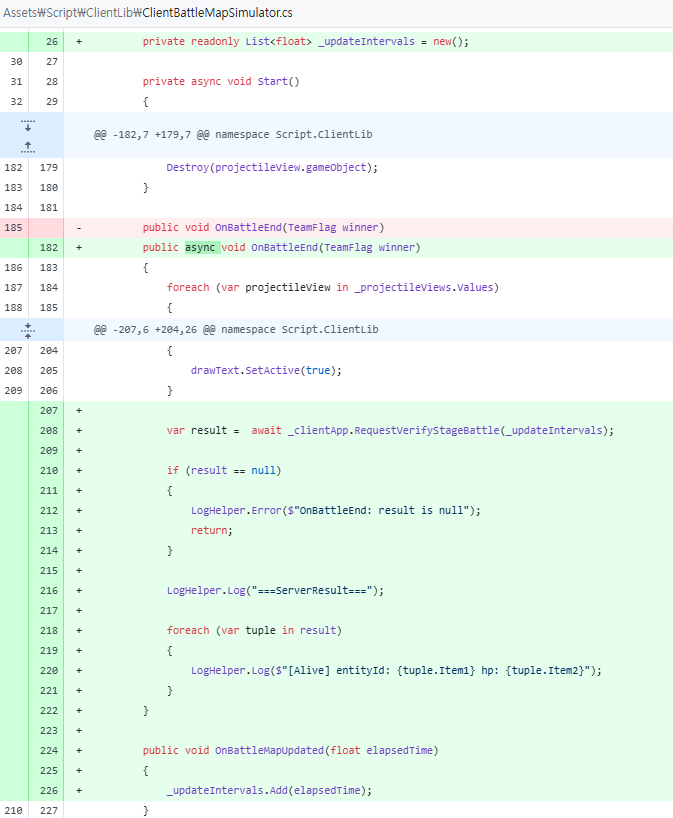

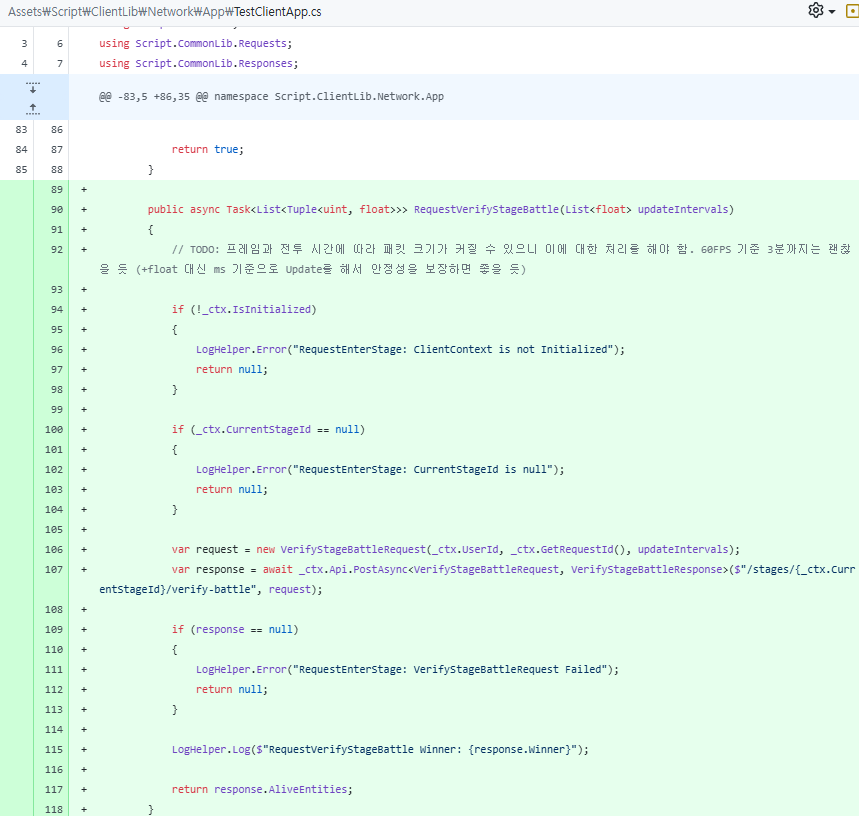
이후 클라이언트에서 전투 종료 시 클라이언트 전투 결과를 출력하고, 서버에 검증을 요청하여 받아온 전투 결과를 출력해주도록 하였다.
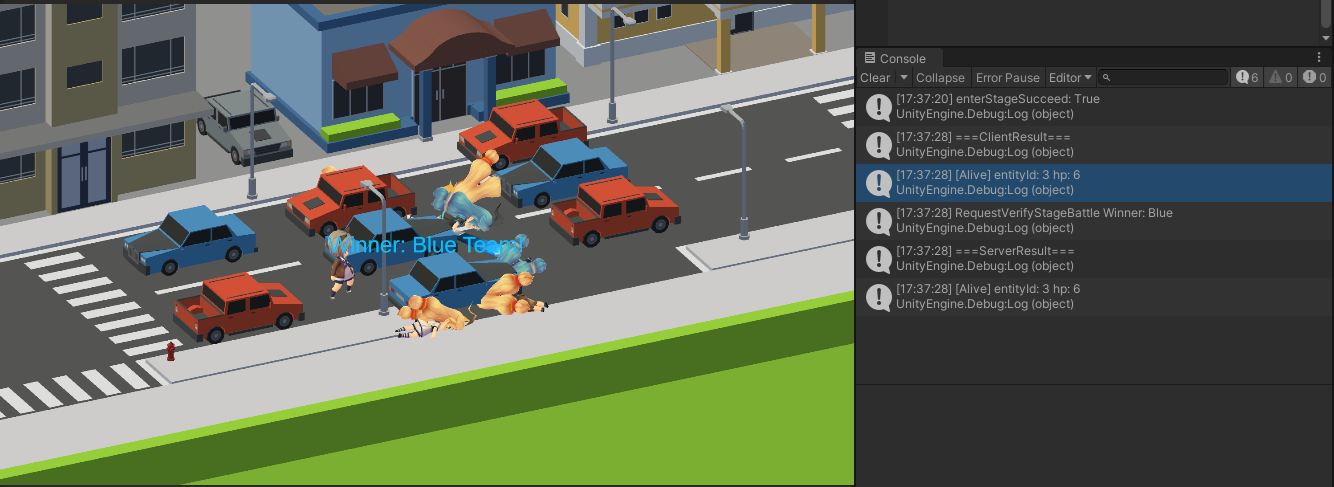
서버를 띄워 전투를 돌려봤을 때, 결과가 동일하게 나오는 것을 확인할 수 있었다.

Entity2의 체력을 1000으로 바꿔서 전투를 했을 때도 동일한 결과가 나오는 것을 확인할 수 있었다.
오늘 작업 결과물은 아래와 같다.
어찌저찌 단기 목표를 마무리지은 것 같아 기쁘다. 곧 설을 쇠러 가야 해서 다소 허겁지겁 만든 것 같긴 하지만 말이다. 그래도 이제는 "된다"는 게 확실해졌다. 설을 쇠고 와서 다음 계획을 세워야겠다. 먼저 단기 목표 기간 중 작성한 코드를 검토해볼 생각이다.
'개발 > 개발일지' 카테고리의 다른 글
| Tactical Combat System 개발일지 7 - Projectile 처리 추가 (1) | 2026.02.11 |
|---|---|
| Tactical Combat System 개발일지 6 - Entity 상태 전이 추가, 공격/사망/전투 종료 구현 (0) | 2026.02.10 |
| Tactical Combat System 개발일지 5 - 진영 구분 추가, 적군 추가, 근처의 적군 탐색 기능 추가 (1) | 2026.02.06 |
| Tactical Combat System 개발일지 4 - 이동할 때 움직이는 애니메이션, 정지하면 Idle 애니메이션 재생 (0) | 2026.02.05 |
| Tactical Combat System 개발일지 3 - 클라/서버 공통으로 사용 가능한 이동 시스템 구현 (0) | 2026.02.04 |